Recl vs Notion
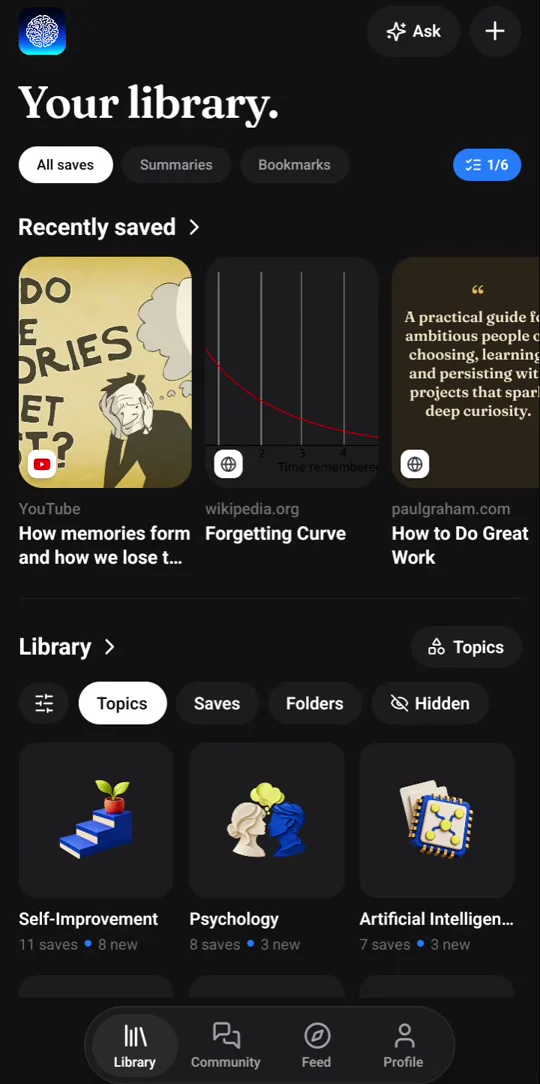
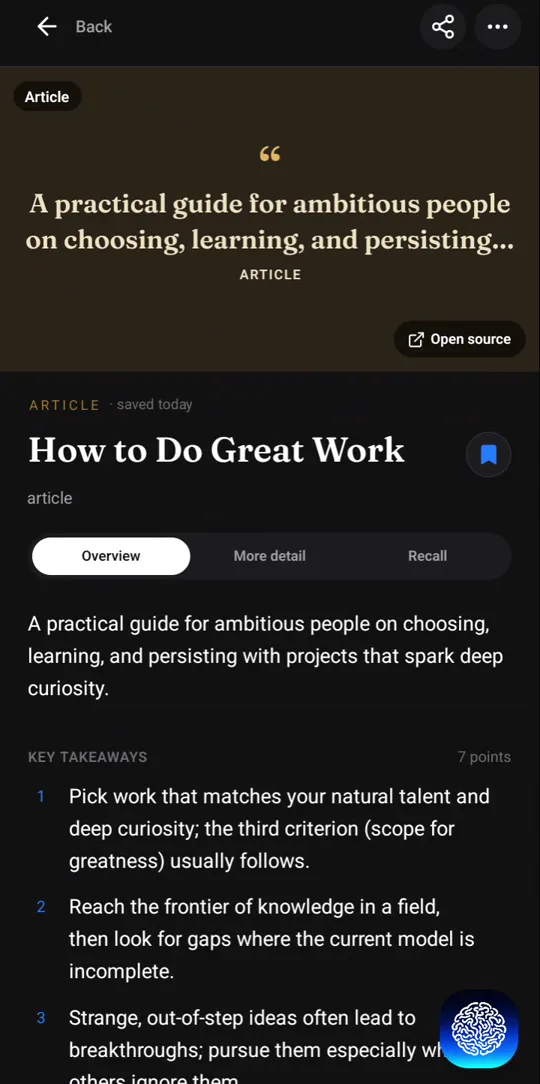
Notion is a flexible workspace for notes, docs, wikis and databases that you design and maintain yourself, with Notion AI on its higher-tier plans. Recl does one narrower job: it summarizes the videos, articles and posts you save, sorts them into topics, and quizzes you over the following weeks so you remember them.
Compiled from Notion’s public site on 2026-10-22. Features and prices change — confirm current details at notion.com.
Recl vs Notion, feature by feature
| Feature | Recl | Notion |
|---|---|---|
| What it is | A memory system for the content you save | A workspace you build from pages, docs and databases |
| Writing your own notes | Quick notes, kept beside your saves | Its core strength: docs and databases you write and shape |
| Saving from the web | Chrome extension, or your phone's share sheet | Web Clipper for Chrome; clip from the Notion mobile app |
| AI summary when you save | Automatic, with timestamps for video | On request with Notion AI (Business plan; a trial on Free and Plus) |
| Organization | Automatic topics — no folders to choose | Whatever structure you design |
| Spaced recall | Built in: quizzes and push nudges, gaps of 1, 3, 7, 14, 30 and 60 days | Not a listed feature |
| Ask your notes | Ask your library; answers name the saves used | Notion AI can find answers across your workspace |
| Seeing connections | A knowledge graph of saves that share topics (web) | Links and backlinks between pages |
| Collaboration | A personal library, with an optional public profile | Built for collaboration: sharing, permissions and comments |
| Free option | No free plan; every plan has every feature | A Free plan; paid Plus, Business and Enterprise plans |
| Platforms | Web app, Android, iOS, Chrome extension | Mac and Windows apps, mobile apps, and a Chrome Web Clipper |
A system you build, or one that builds itself
Notion gives you blocks and databases and lets you build exactly the system you want: a reading list with status columns, a second-brain template, a wiki for your team. That flexibility is why people love it, and it is also the cost. The system is only as current as the time you spend maintaining it — a clipped article sits in a database until you open it, read it, and write the summary yourself or ask Notion AI to.
Recl makes the opposite trade. There is almost nothing to set up: save a video or an article and the summary, the topics and the quiz appear on their own. You give up the freedom to design your own structure; in return, nothing you save waits on you to process it.
Recall is the part Notion leaves to you
Notion can store what you learn, but spaced review is not one of its listed features, so bringing ideas back is up to you. In Recl it is the default: each save becomes questions, and nudges arrive with the gaps between them growing through 1, 3, 7, 14, 30 and 60 days.
Using both
Plenty of people will keep both: Notion for what you write — plans, projects, drafts, team docs — and Recl for what you watch and read. One holds your own thinking; the other makes sure the ideas you took in from other people are still there when you need them.
Where Recl fits better
- You want what you save summarized, sorted and quizzed without building a system first.
- Most of what you want to remember is video, podcasts, posts and articles made by other people.
- You want reviews to come to you on a schedule, as push notifications.
- You save from your phone and want each item processed by the time you open it.
Where Notion fits better
- You write a lot of your own notes, documents and plans.
- You want to design your own pages and databases.
- You work with a team and need shared pages, comments and permissions.
- You want to start on Notion's Free plan.
Frequently asked questions
- Can Recl replace Notion?
- Not as a workspace. Recl is not built for writing documents, running projects or sharing a team wiki. It replaces the part of a Notion second brain where clipped videos and articles pile up unread: Recl summarizes them, sorts them into topics and quizzes you on them.
- Does Notion have spaced repetition?
- It is not a listed Notion feature, so bringing ideas back is up to you. In Recl it is the default for every save, with no setup.
- Does Notion AI summarize what I clip?
- Notion AI can summarize a page when you ask it to; Notion's pricing page lists full Notion AI on its Business plan, with a trial on Free and Plus. Recl writes a summary automatically for every save, with timestamps for video.
- How do I save to Recl instead of clipping to Notion?
- Use the Recl Chrome extension on any page, share from your phone's share sheet, or paste a link on the web. The summary is usually ready within about a minute, already sorted into topics.
- Does Recl have a free plan?
- Not right now. Recl is a paid app — monthly and yearly plans both unlock every feature, and you can cancel anytime.
Read more
Related comparisons
Try Recl
Save one video today and see if you still remember it next month. Every plan unlocks every feature.